1
MODEL: AstroStart RSS-5224
2-Way LCD (XRT) Remote Start and Security System with One Mile of Range
Rev.: 20091103
Page 2
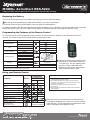
Replacing the Battery
The LCD of the 4-button remote has a battery icon telling you when to replace the battery.
We strongly recommend keeping a replacement battery in your glove compartment.
The remote controls require one AAA battery. See your dealer for spare batteries.
To replace the battery, slide the latch sideways and remove the battery cover on the back of the remote control case, remove old
battery and replace it with a new one. Make sure the battery is placed the right way (see pictogram inside the cover).
Programming the Features of the Remote Control
To access the remote control programming mode, press the “P” button located on the back of the remote and hold it for 5
seconds. The remote beeps once to indicate entering programming mode.
PARAMETERS
Keyboard Un/Lock
Mute
Status confirmations
S ETTINGS
BUTTONS
D ISPLAY / REMARKS
Lock
/ 1 BEEP
Unlock
/ 2 BEEPS
Disabled
/ 1 BEEP
Enabled
/ 2 BEEPS
Enabled
/ 1 BEEP
Disabled
Trunk
Motion sensor*
Auxiliairy sensor icon
Glass breakage sensor*
Tilt sensor*
Ultrasonic sensor*
Upon "Status" command
Back-light
Upon any command
Never
Number of vehicle
1 – 4 (Default setting : 2)
LEGEND : DISPLAYED ICON (BLACK) : MASKED ICON (GRAY) : DEFAULT SETTING
/ 2 BEEPS
1 BEEP
2 BEEPS*
3 BEEPS*
4 BEEPS*
5 BEEPS*
THE DISPLAY LIGHTS -UP
FOR 3 SECONDS
BACK-LIGHT SHUTS OFF
1234
* These settings are not available with the XL202 module.
Refer to the vehicle user manual for more
information on confirmations emitted by
your vehicle (i.e. the horn, parking lights
and siren). These confirmations are
different for each vehicle, depending on
which module/firmware is used.
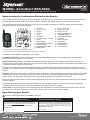
Using your Remote Control
CONFIRMATIONS
COMMANDS
BUTTON
SENT BY REMOTE CONTROL
* COMMANDS FOLLOWED BY AN ASTERISK (*) APPLY ONLY TO COMMAND
CONVENIENCE
Ö THIS COMMAND TERMINATES THE RUNTIME, PANIC MODE AND ALARM
UNITS EQUIPPED WITH A SECURITY SYSTEM.
S tart
STOP
SECURITY
Ê
Ö
LOCK / ARMING *
PANIC (BUTTON HELD FOR > 4 SEC.)
LEGEND : DISPLAYED ICONS (BLACK) : HIDDEN ICONS (GRAY)
STATUS (ONLY IF THE FACTORY ALARM TRIGGER MONITORING FEATURE IS
SUPPORTED BY THE FIRMWARE).
ö TEMPORARY VALET MODE IF ACTIVATED A SECOND TIME DURING
REARMING DELAY.
Ê START CONFIRMATION CAN TAKE FEW SECONDS EXCEPT IF THE ENGINE IS
ALREADY RUNNING.
OR
UNLOCK / DISARMING * ö
TRUNK (BUTTON HELD FOR > 4 SEC.)
ACTIVATE / CANCEL A UX 1
STATUS
ACTIVATE / CANCEL A UX 2
VEHICLE SELECTION
(BUTTON HELD 1.5 SEC.)
/
/
HIS BUTTON IS LOCATED
ON THE BACK OF THE REMOTE
Refer to the vehicle user manual for more information on
confirmations emitted by your vehicle (i.e. the horn, parking
lights and siren). These confirmations are different for each
vehicle, depending which Bypass is used.
© 2009 Directed Electronics. All rights reserved.