1
5. Operation
1) Switch on the device with the Main power switch
○12
2) Select the right Video input
3) Adjust the Brightness control □
+ □
- in order to obtain an image
as clear and sharp as possible.
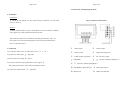
1.Contents :
5.6” Monitor x 1
Sun Shield x 1
Power supply x 1
Bracket Foot + Back Plate x 1
Screws x 6 pcs
4) Adjust the Volume for the headphones to the desired level with the volume
control (Optional )
5) You may push the reverse image function button (5), (6) if the monitor is
connected to a Rear View Camera.
6) Please push OSD Control Manu○7 bottom to select the Brightness, Contrast,
CAUTION: When using headphones do not adjust a high vol.
Permanent high volumes may damage person’s hearing! The human ear
gets accustomed to high volumes which do not seem to be that high
after some time. Therefore, do not further increase a high volume after
getting used to it .
6. Application range
The LCD color monitors offer a sharp and high contrast display. They can be
universally applied, e.g. in surveillance systems, in reverse monitoring car systems or
for multimedia applications. Moreover, an additional Audio input enables sound
transmission via headphone
Fig. 1. Accessories
Page 5 of 6