1
Integrated Circuits Inc.
z
APR9600-4081A DB
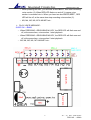
MESSAGE MANAGEMENT MODES :
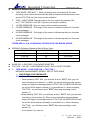
1. TAPE MODE ( DEFAULT ) : When recording multi-voice sections, the later
recording voice section will automatically skip and save behind the former voice
section(TACT SW only)-No voice section limitation.
2. TAPE – NEXT MODE: Manually skip to the next section by pressing “M2
key”( “TACT SW=M1” and “M2” key)-No voice section limitation.
3. 1-FIXED-MESSAGE: Only one voice section could be recorded.
4. 2-FIXED MESSAGE : The length of the section is divided equally into 2 section
voice messages.
5. 4-FIXED MESSAGE : The length of the section is divided equally into 4 section
voice messages.
6. 8-FIXED MESSAGE : The length of the section is divided equally into 8 section
voice messages.
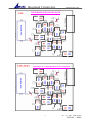
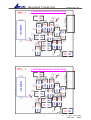
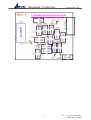
THERE ARE J1,J2 & J3 BONDING OPTIONS FOR THE MODES ABOVE.
z
APR9600: Reference Sampling Rate & Rosc Value.
SAMPLE RATE
DURATIONS
Rosc
8 K Hz
32 “
24K Ohm
6.4 K Hz
40 “
38 K Ohm
4.2 K Hz
60 “
84 K Ohm
z
z
SLIDE SW. Æ RECORD / PLAY MODE SELECTED
TACT SW. = M1 KEY Æ RECORDING VOICE / PLAY VOICE TRIGGER
z
A.
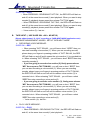
TAPE MODE : ( USE SLIDE SW. + TACT SW. )
MESSAGE MANAGEMENT MODES : SETUP TAPE MODE
¾ RECORDING VOICE MESSAGE :
SLIDE SW. = REC
→ When pressing TACT SW., you will hear a short “ BEEP” then you can
start recording voice section (1). When you are recording sounds, please
keep your fingers in pressing position of TACT SW, the RED LED will flash
on and off and it means a sound (1) is recorded into ic. When releasing
TACT SW., you will hear a short “BEEP”then stop recording a voice
section (1)
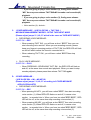
→When pressing TACT SW., you will hear a short “ BEEP” then you can start
recording a voice section (2). When you are recording sounds, please
keep your fingers in pressing position of TACT SW, the RED LED will flash
on and off and it means a sound(2) is recorded into ic. When releasing
TACT SW., you will hear a short “BEEP”then stop recording a voice
section (2)
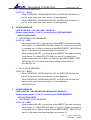
→ Voice section (3)~ last etc..
2
Ver : 2.0 Date: APR.04,2005
PCB NO. : 4081A