1
October 1999
CAN Interface parameters
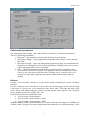
Can network interface config – this control allows to define the can interface parameters.
There are following possibilities:
1. Baud rate – this parameter must be equal for all devices on the bus.
2. Write queue length – if user applications send rather often, maybe, a user can arise
this value.
3. Read queue length – a user can change this parameters in order to accommodate the
frequency of sending data by device and possibilities of BridgeView system (server,
engine and application) receives messages.
4. Port – a National Instrument board can have two buses and it is possible to have
more then one board on a computer. This parameter defines with what bus a server
works. A user can register more then one CANopen server. In order to do it, it is
necessary to repeat the registration procedures with a deferent name and port
number.
Devices
Usually a CAN network consists of several nodes which communicate via the CANopen
protocol.
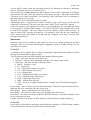
For the CANopen server each node is a device that can send messages across network. Each
CAN node or a device has to be described in the device table. This table has three field;
device name, node number and type of device profile that the node supports. The CANopen
server supports two device profiles: 401, 404.
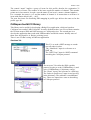
Each device has the three predefined items
• <Device name><node number>
• <Device name><node number>_status
• <Device name><node number>_NMT
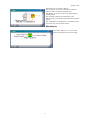
A device name is LMB and node number is 26 means that the item names are LMB26 and
LMB26_status. Using the first item an application can send and receive SDO massages. There
2