1
Quick Start Guide
To power the watch on, please install the battery back (find it in watch box) on the watch,
then hold the power button (the only button on the side) for 3 seconds. There might be a
chance the battery is drained, if it doesn’t turn on, please charge the watch for an hour and
attempt to power it on again. The watch can be used in two different modes:
To Use Gear in the Companion Mode (Paired with a
smartphone):
Step 1: Download Mediatek Smart Device from Google
Play
*Mediatek App is only available to Android Devices. iOS device will not get push
notifications. *Please note that app sometimes has unexpected bugs. Our technical team
will try our best to reach you when it happens. If you are experiencing issues, email us at
info@veezy.us immediately, our customer support team will get back to you at the
earliest time possible.
Step 2: Turn on notification for Mediatek
*When Mediatek App is turned on the first time, please confirm the pop up that ask to
turn on notifications. If you missed this pop up, please go to your smartphone’s setting
--- accessibility --- services --- check Mediatek.
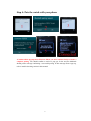
Step 3: Turn on phone Bluetooth and Search for Watch
*If the phone can’t find the watch, please refer to troubleshooting second of this manual.
2