1
PAGE 21
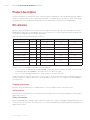
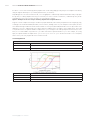
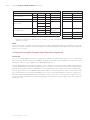
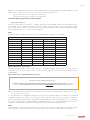
Figure 9. MicroPlex v2 Single Indexes
Each well of the Single Index Plate contains a unique Illumina® -compatible 8nt Sanger index sequence. The first 12
MicroPlex v2 single indexes share the same sequence in the first 6 bases (shown in BOLD) as the Illumina® TruSeq LT
indexes AD001 through AD012.
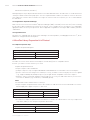
MicroPlex V2 Single-Indexed Library Structure
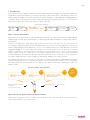
5’ AATGATACGGCGACCACCGAGATCTACACAGGCGAAGACACTCTTTCCCTACACGACGCTCTTCCGATCT----Insert-------Insert----AGATCGGAAGAGCACACGTCTGAACTCCAGTCACNNNNNNNNATCTCGTATGCCGTCCTTCTGCTTG 3’
Sanger index
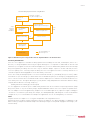
Figure 10. MicroPlex v2 single-indexed library structure
Libraries prepared from the MicroPlex Library Preparation kit v2 contain the 8nt Sanger index on the 3’ end.
Plate Handling Instructions for Low Throughput Applications
MicroPlex v2 48S Kit is designed for high throughput applications; therefore, the experiment should be designed to pool
and sequence the full set of 48 libraries using the entire plate of Indexing Reagents. If Indexing Reagents from the entire
plate are not used at the same time, it is critical to follow the instructions below to avoid cross contamination:
After removing Indexing Reagents of choice, cover any pierced or used index wells with scientific tape (e.g.,
VWR, Cat. No. 89097-920, General-Purpose Laboratory Labeling Tape, 0.5”).
Thoroughly wipe the seal with 70% ethanol and allow it to dry completely.
Replace the plastic lid, return the SIP to its sleeve and store at −20°C.
The Index Plate should not be frozen and thawed more than 4 times.
Multiplexing and Index Pooling
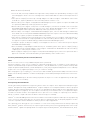
Multiplexing and pooling less than the full set of 48 libraries is possible on the MiSeq.
NOTE:
For MiSeq RTA v1.17.28 and later, base pair diversity of indexes is no longer checked by IEM because low-plexity index
reads can be processed for all applications; any combination of indexes can be pooled for sequencing on MiSeq.
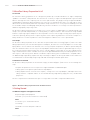
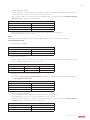
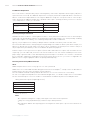
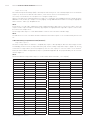
Figure 11. Single Index Plate maps with well locations
The 48S Single Index Plate contains Illumina® -compatible indexes with 8nt Sanger sequences. The colored wells indicate
well positions containing Indexing Reagents.
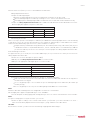
Sample Sheet Setup
The Illumina® Experiment Manager (IEM) is a desktop tool that allows you to create and edit Sample Sheets for Illumina®
sequencers. Make sure the latest version of IEM (version 1.8 or later) is installed.
Create a Sample Sheet using the IEM, then manually copy and paste the appropriate 8nt single index sequences to be
used to the CSV file of the Sample Sheet.
Index sequences can be downloaded as a CSV file at the MicroPlex v2 product page.
NOTE:
The IEM will not check for color-balanced index combinations when indexes are entered manually from the CSV file.
Sample Sheet Setup
The Illumina® Experiment Manager (IEM) is a desktop tool that allows you to create and edit Sample Sheets for Illumina®
sequencers. Index combinations may be validated using the IEM, which notifies user when improper combinations are
used. Make sure the latest version of IEM (version 1.8 or later) is installed.
www.diagenode.com |