1
USB
l-.
&
rl
'I
+i t
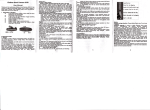
Place the SIM €rd in
the sense described
ebove @ntre.lnsl it
until it clicks, if neceL.;',.:: ssary help yourself
).1=.:i
to the metal plat.
S
|-l
tl
l
tl
i
Replaethescrewto
at the end of the your
in the dlrection indlcated in the illustration.
connectorPlace the USB connector located
watch nobile phone
prctact the card SIM
Strew thoroughly.
ll
i
-
+
You can either connect the USB connec-tor to USB 2.0 port of your computer or
I
us6 the supplied USB cable and chargo your Essential and without rsmoving it
from your wrist.
Once the upload is p€rformed, the screen shows "loading finished..you mn uss
3.
your Essential now
Charging the battery:
The battory supplied with your Mobile Watch should be used immediately. tf the
battary level is low the display shore "Battery empty'. ln such
connect the adapter and.your Mobile Watch with the supplied
€ble.
Connect
Connecting to a network:
After inserting your SIM card and switching on, the phone will automatically search for the
network. You can then dial or receive calls and access the phones other functions.
adapter sector to a wall outlet
The battery can be recharged using the USB
4.
a €se:
€ble
supplied with the Mobile Watch: