1
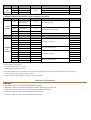
Enter
Code
*+Installati
on
Password+
100
Value
USER ID
110
CENTER ID
600
01/05/11/15
Description
Exit
#
Default
Set USER ID
000000
Ser CENTER ID
000000
Enable IP transmission
01
If obtain an IP address automatically, no need to do below programming:
Enter
*+User
Password+
Enter
*+Installati
on
Password+
Code
Value
Code
104
1st & 2nd & 3rd Part
of the IP address
+#
105
te 4th Part of the IP
+0000+#
106
1st & 2nd & 3rd Part
of the IP address
+#
107
te 4th Part of the IP
108
Check Code
Code
+8503+#
+#+#
Value
601
1st part of the IP
602
2nd part of the IP
603
3rd part of the IP
604
4thpart of the IP
605
1st part of the Port
606
2nd part of the Port
608
1st part of the IP
609
2nd part of the IP
610
3rd part of the IP
611
4thpart of the IP
612
1st part of the Port
613
2nd part of the Port
Description
Set IP of the gateway
Set IP & Port of the equipment
Input check code to do networking security
Description
Exit
+#
+#
+#
+#
+#
+#
+#
+#
+#
+#
+#
+#
Default
Default
Set IP of the first Server
Set Port of the first Server
Set IP of the first Server
Set Port of the first Server
Notice:
1. Value of the IP must be in Hex.;
2. 'E' on keyboard stands for '*', 'F' for '#';
3. Value of the Port must be in decimal;
4. Regarding the 600 code: the first letter '0' for obtaining IP automatically, '1' for setting fixed IP; the second letter '1' for IP priority,
'5' for dual-transmission: PSTN and IP both enabled;
5. Default installation PWD is 014014; and default user PWD is 123456.
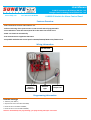
Indicator Information
Red light
1. Slow Flash: 1 per sec. means disconnected with the network;
2. Slow Flash: 2 per sec. means wrong connection of data cable with the control panel;
3. Slow Flash: 3 per sec. means poor contact (disconnected with the network);
4. Fast Flash: 5 per sec. means connected with the second server;
5. Fast Flash: 10 per sec. means connected with the first server;