1
USING HeRO® ES
Admitting and Discharging Patients
When a new patient is transferred into the bed being monitored by HeRO ES, it is necessary
to clear the stored HeRO scores and heart rate data from the previous patient. This ensures
that the displayed numeric score and trend graph are based solely on heart rate data from the
new patient.
Automatic Admit and Discharge
HeRO ES can detect the name and Medical Record Number (MRN) of the patient currently
admitted to the Intellivue MX patient monitor. When HeRO ES detects a change in the
demographic information, it will automatically clear the old patient data and create records for
newly admitted patients.
To take advantage of this automatic admit/discharge functionality, simply use the Admit and
Discharge functions of the Philips Intellivue system. When a patient moves into a bed, Admit
the patient to the monitor, specifying a valid MRN (one which is unique to that patient). When
the patient leaves the bed, use the Discharge function to clear the patient data from the
Intellivue. Note that it is not necessary to Discharge a patient that is leaving the bed
temporarily but will soon return (e.g. for surgery).
Clearing Data Manually
If your work flow does not make use of the Admit and Discharge functionality of the Philips
Intellivue system (that is, you do not admit patients to monitors or you leave “dummy” patients
admitted all of the time), you must manually clear the HeRO ES patient data when moving a
new patient into the monitored bed.
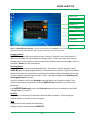
To manually clear patient data, click Discharge in the HeRO ES Patient Window Finally, click
Yes to confirm the operation.
You must use one of the above methods of handling Admit and
Discharge operations to ensure accuracy of the displayed scores.
- 21 -