1
DIL/NetPC DNP/9200 User Manual – Installing the SSH Connection
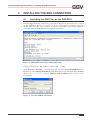
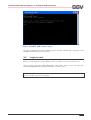
Figure 14: PuTTY SSH session as ‘guest’
To gain root permissions while working as guest enter the command su (“superuser”) and
hit Return if Linux asks for a password.
3.4
Login as root
Before you can login as root in a Telnet session, you have to set a password for root.
Open a serial connection (HyperTerminal), start Linux, login as root and enter the
command passwd. Just follow the instructions on the screen.
Please note: The root password is temporary. After a reset of the DNP/9200 you
have to set the root password again.
SSV EMBEDDED SYSTEMS
13