1
1. Table of Contents
KBox A-101 – User’s Guide (Version 1.00)
1. Table of Contents
1. Table of Contents ................................................................................................................................... 1
1.1. Table of Figures .................................................................................................................................... 2
2. Introduction ......................................................................................................................................... 4
2.1. Symbols used in this Manual.................................................................................................................... 5
3. Important Instructions ........................................................................................................................... 6
3.1. Warranty Note...................................................................................................................................... 6
3.2. Exclusion of Accident Liability Obligation ................................................................................................... 6
3.3. Liability Limitation / Exemption from the Warranty Obligation ........................................................................ 6
4. Safety Instructions ................................................................................................................................ 7
4.1. Electrostatic Discharge (ESD) .................................................................................................................. 7
4.1.1. Grounding Methods ........................................................................................................................ 7
4.2. Hot Surface Warning ............................................................................................................................. 7
5. Electromagnetic Compatibility (Class A Device) .......................................................................................... 8
5.1. Electromagnetic Compatibility (EU) .......................................................................................................... 8
5.2. FCC Statement (USA) ............................................................................................................................. 8
5.3. EMC Compliance (Canada) ....................................................................................................................... 8
6. Scope of Delivery ................................................................................................................................... 9
6.1. Type Label and Product Identification........................................................................................................ 9
7. Product Description.............................................................................................................................. 10
7.1. Front Side ......................................................................................................................................... 11
7.1.1. DC IN – Direct Current Connector ..................................................................................................... 11
7.1.2. Controls and Indicators ................................................................................................................. 11
7.1.3. External Interfaces of the SBC at the Front Side ................................................................................... 13
7.1.4. Optional Interfaces on the Front Side................................................................................................ 14
7.2. Rear View .......................................................................................................................................... 17
7.2.1. GPIO Interface (Option) ................................................................................................................. 17
7.2.2. WLAN (Option) ............................................................................................................................ 17
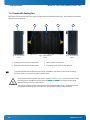
7.3. Chassis with Cooling Fins ...................................................................................................................... 18
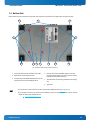
7.4. Bottom Side ...................................................................................................................................... 19
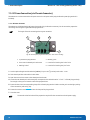
7.5. DC Power Connection (via Phoenix Connector)........................................................................................... 20
7.5.1. DC Power Connector ...................................................................................................................... 20
8. Starting Up ......................................................................................................................................... 21
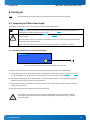
8.1. Connecting to DC Main Power Supply ....................................................................................................... 21
8.1.1. Connecting the KBox A-101 to a DC Main Power Supply ......................................................................... 21
8.2. Operating System and Hardware Component Drivers ................................................................................... 22
9. Setting Up the KBox A-101 .................................................................................................................... 23
9.1. KBox A-101 – Desktop Version ............................................................................................................... 24
9.2. Wall or Table or Cabinet Mount using the Brackets ...................................................................................... 25
9.2.1. Brackets for Wall / Table Mount ....................................................................................................... 25
9.2.2. Bracket for Cabinet Mounting.......................................................................................................... 27
9.2.3. DIN Rail Mounting Clip................................................................................................................... 28
www.kontron.com
1