1
Chapter 19.
Other Networking Options
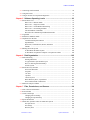
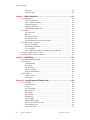
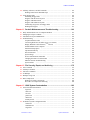
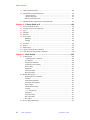
Sections in this chapter:
• 19.1 “Hardware Options,” this page
• 19.2 “Direct Connections,” page 262
• 19.3 “Using a Modem,” page 263
• 19.4 “Using Mail on a Client Machine,” page 264
• 19.5 “Avoiding Disk Full Problems with Mail,” page 264
• 19.6 “Other Software,” page 266
This chapter is an attempt to cover the broad topic of how to connect two Sun systems
through a direct RS-232 serial link, a modem, a phone connection, or a packet-switched
data network (PSDN). Also included are some instructions on using electronic mail (email) on systems connected to Internet:
This topic is quite extensive, the software and its configuration files are rather convoluted
and, to some extent, specific to the hardware involved. It is not possible to cover this topic
completely in this manual. In many cases, it will be necessary for you to seek the help of
an expert to solve site-specific problems.
19.1 Hardware Options
The simplest way of connecting two systems via serial line is a direct RS-232 connection.
Compared to RS-232, Ethernet is about 100 times faster, simpler to use, more reliable, built
into every Sun, and can span over longer distances (depending on the hardware). For these
many reasons, the RS-232 connection is almost never used except for a special application,
such as to provide some loose but safe connection between a mail server on a public
network and another system on a local network, to prevent outside people from breaking
into a local network. With such a connection, overall transfer rates of up to approximately
1750 bytes per second (at 19,200 baud) can be obtained (compared to several hundred
kilobytes per second with Ethernet).
The main application for connections via serial lines is to link two systems that are not
located in the same site. In fact, any two systems in the world can, in principle, be connected
using the serial ports. There are two basic options for doing this: using regular phone lines
in a dial-up connection or using a dedicated line into a public data network. Phone lines are
typically accessed via modem. Common modem transfer rates are 9600 to 28800 baud
(about 1000 to 3000 characters per second) or sometimes over 50 kilobaud using data
compression.
To access public networks (assuming you cannot access the Internet via local network and
gateway), a simple dial-up serial line using a modem is not good enough. You need a full
IP (TCP/IP) connection such that e-mail transfers, FTP (data transfers with error checking),
01-999166-00 C0503
System Administration
261