1
INTRODUCTION TO THE LEGO MINDSTROMS EDUCATION KIT
What’s in the kit?
The kit contains two pamphlets which provide the details of the parts in the kit. The pamphlet with
the number 4581599 (at the top of the pamphlet), provides a picture of each part, its part number and
quantity of the part in the kit.
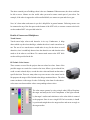
For example: Here the picture represents the part called ½ yellow Bush, 10x means
there are total of 10, ½ yellow Bush in the kit and the number after x is the part
number.
The other side of this pamphlet and the other pamphlet represents the same details as the side that we
just saw but without the part numbers. You will be given other sensors, detail of which is not
included in these pamphlets because those are ordered separately. Details of those parts are given
briefly in the next section and will be discussed throughout the paper. So now that you know what‟s
in the kit, let‟s move on to how to use those parts.
Where to use what?
Most of the connectors, bricks and plates will be used to build the robot. If you need to build a
specific type of robot the step by step instructions will be given in the lab handout. Otherwise, you
can use those parts as you need to meet your assignment details.
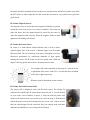
The part with the number 4558295, is called the intelligent micro-computer LEGO Brick (also
known as the NXT brick), acts as the brain of the robot. The brick has a USB port which lets the user
download the programs from computer to the brick. Besides the USB port, the brick has four input
ports (1 to 4) to connect sensors and multiplexer for sensors (multiplexer is used if the robot requires
more than four sensors) and three ports (A to C) to power motors. The brick can be charged using the
charger or the 4 batteries. So no matter what the assignment is, the NXT brick is the one thing that is
necessary.