1
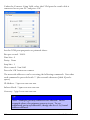
Under the ‘Connect Using’ field, select the COM port the serial cable is
connected to on your PC, and press ‘OK’.
Set the COM port properties as pictured above.
Bits per second: 38400
Data bits: 8
Parity: None
Stop bits: 1
Flow control: Xon/Xoff
Press the ‘OK’ button to connect.
The network addresses can be set using the following commands. Note that
each command is preceded with ‘* ‘ (the asterisk character [shift-8] and a
space)
IP Address: * ipa xxx.xxx.xxx.xxx
Subnet Mask: * ipm xxx.xxx.xxx.xxx
Gateway: * gip 0 xxx.xxx.xxx.xxx
Note: Multiple gateway addresses are allowed. In the
example above, the primary gateway is set. To set
additional gateway addresses, change the 0 to 1-3 (4 total
address allowed.
144
Aavelin User Manual