1
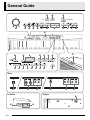
General Guide........................... E-2
Installing the Music Stand........................................... E-3
Saving Settings and Using Panel Lock....................... E-4
Returning the Digital Piano to Its
Factory Default Settings ............................................. E-4
Recording Your
Keyboard Play ........................E-34
Using an AC Adaptor .................................................. E-5
Recording or Playing Back a Single Song ................ E-34
Recording or Playing Back Multiple Songs ............... E-35
Recording to a Specific Track (Part) ......................... E-35
Deleting Recorder Data............................................. E-37
Re-recording Part of a Recorder Song
(Punch-in Recording) ................................................ E-37
Connections.............................. E-6
Other Settings.........................E-40
Connecting Headphones ............................................ E-6
Connecting a Pedal .................................................... E-6
Connecting Audio Equipment or an Amplifier ............. E-7
Bundled and Optional Accessories............................. E-8
Configuring Settings.................................................. E-40
Power Outlet ............................. E-5
Using Built-in Tones ................ E-9
Turning on the Digital Piano and
Playing Something...................................................... E-9
Selecting a Tone......................................................... E-9
Layering Two Tones ................................................. E-10
Splitting the Keyboard between Two Tones ............. E-11
Using Octave Shift .................................................... E-12
Adjusting the Brilliance of a Tone ............................. E-12
Adding Reverb to the Tone....................................... E-13
Adding the Chorus Effect to the Tone....................... E-13
Using the Metronome ............................................... E-14
Using the Pitch Bend Wheel ..................................... E-15
Playing a Duet .......................................................... E-15
Using Auto
Accompaniment ..................... E-17
Playing an Auto Accompaniment.............................. E-17
Using One-Touch Presets ........................................ E-20
Using Auto Harmonize.............................................. E-20
Creating Your Own Original Rhythms....................... E-21
Using a Memory Card ............E-44
Loading and Removing a Memory Card ................... E-45
Formatting a Memory Card ....................................... E-45
Saving Digital Piano Data to a Memory Card............ E-46
Loading Data from a Memory Card........................... E-47
Deleting Memory Card Data...................................... E-47
Renaming a Memory Card File ................................. E-48
Playing Back a Song from a Memory Card ............... E-48
Saving Data to Digital Piano Memory
(Internal Area) Instead of a Memory Card................. E-49
Error Messages......................................................... E-50
Connecting to a Computer ....E-51
Minimum Computer System Requirements .............. E-51
Connecting the Digital Piano to Your Computer ....... E-51
Using MIDI ................................................................ E-52
Transferring Data between the Digital Piano
and a Computer ........................................................ E-52
Reference ................................E-56
Troubleshooting ........................................................ E-56
Product Specifications............................................... E-57
Operating Precautions .............................................. E-58
Playing Demo Songs.............. E-24
Appendix ...................................A-1
Playing Tone Demo Songs ....................................... E-24
Listening to Songs Loaded from an
External Source ........................................................ E-25
Tone List ..................................................................... A-1
Drum Assignment List ................................................. A-3
Rhythm List ................................................................. A-4
Music Preset List......................................................... A-6
Fingering Guide........................................................... A-8
Chord Example List..................................................... A-9
Music Presets ......................... E-27
Selecting a Music Preset .......................................... E-27
Creating an Original User Preset.............................. E-28
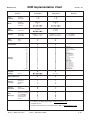
MIDI Implementation Chart
Registering Tone and
Rhythm Setups ....................... E-32
Saving Registration Data .......................................... E-33
Recalling a Registration............................................ E-33
Company and product names used in this
manual may be registered trademarks of others.
E-1
English
Contents