1
Wait for the system to run through a self-test of controller memory. During this
test, the screen blinks, and when the first row of lights (level 0) on the operator
panel is on, the system is ready for use.
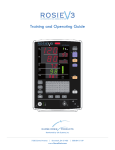
Figure. Vela control settings. Far left
is the suction, the middle is the RF and
the far right is the Infrared.
Define the Treatment Mode Intensity on the Vela.
The operator panel is located on the top of the applicator. The panel consists of
three treatment mode buttons and an information screen. There is the IR mode
(Infrared light energy). The RF mode (Radio Frequency), and the vacuum
shaping mode.
Use the mode buttons to control the intensity of IR, RF, and vacuum-suction
applied to the patient. Each time you press this button, you move the intensity up
to the next level as indicated by the lights on the control panel.
37