1
THE SEAWARD OPERATING INSTRUCTIONS
THE LEEWAY OPERATING INSTRUCTIONS
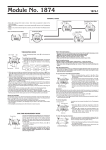
Hour hand
Minute hand
Button A
1
2
3
Crown
24-hour hand
Chronograph
minute hand
Chronograph
second hand
Normal crown position
Button B
Calendar
To set the time:
To set the time:
1. Unscrew and pull crown completely to position 3 (two clicks).
1. Unscrew and pull crown completely to position 3 (two clicks).
2. Turn crown counter clockwise to correct time.
2. Turn crown counter clockwise to correct time.
3. Push in to position 1 and screw down crown.
3. Push in to position 1 and screw down crown.
To set the date:
To set the date:
1. Unscrew and pull out crown to middle position 2 (one click).
1. Unscrew and pull out crown to middle position 2 (one click).
2. Turn crown counter clockwise to correct date.
2. Turn crown counter clockwise to correct date.
3. Push in to position 1 and screw down crown.
3. Push in to position 1 and screw down crown.
To set the day:
Using the chronograph:
1. Unscrew and pull out crown to middle position 2 (one click).
This chronograph is able to measure and display time in 1/1 second united up to
2. Turn crown clockwise to correct day.
maximum of 1 hour.
3. Push in to position 1 and screw down crown.
Measuring time with the chronograph:
1. The chronograph can be started and stopped each time button “A” is pressed.
2. Pressing button “B” resets the chronograph and all hands return to their 0
positions. Only push button “B” when the chronograph has stopped.
Resetting the starting position of the chronograph second hand:
1. Unscrew and pull the crown out to the 2nd position.
2. Push button A to set position of the chronograph second hand.
3. Once the hand has been set push back the crown on normal position and screw
down to seal.
WWW.AULTASURF.COM
USER MANUAL PAGE 3