1
Scale Operation
UNDER
III
ACCEPT
2200CW
OVER
NET
lb
ZERO
kg
BATT
oz
g
MOT
1
TARE
2
GROSS
NET
3
4
5
ZERO
6
7
8
PRINT
UNITS
[ ON/OFF ]
ENTER
ACCUM
PROD
ID
OVER
CLEAR
SET
POINT
UNDER
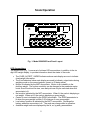
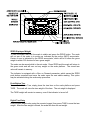
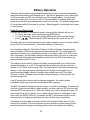
Fig. 1: Model 2200CW Front Panel Layout
LED Annunciators
The Model 2200 (Fig. 1) uses a set of sixteen LED annunciators, in addition to the six
digit LED weight display, to provide information about the status of the scale.
The OVER, ACCEPT, UNDER indicators above main display are use to indicate
checkweight information.
The 8 led indicators below main display are used to indicate: output status during
weighing mode or the current setpoint, preact or ID being edited.
Motion is indicated by the MOT annunciator. Motion is an instability in the
platform weight. The motion sensitivity can be changed in the parameter setup
mode. Some functions like tare, zero and print can only be executed when this
annunciator is lit.
Net mode is indicated by the NET annunciator. When lit, the scale is displaying a
net weight. When not lit, the scale is displaying a gross weight.
Center of zero is indicated by the ZERO annunciator. The ZERO annunciator is
lit when the gross weight is within 0.25 divisions of zero gross weight.
Low battery condition is indicated by the BATT annunciator. Recharge the
battery when this annunciator is lit. The scale can charge while in operation.
Available weight units are displayed by the lb, oz, kg and g annunciators.
5