1
Scale reading is bouncing
or "flighty".
Check for air currents and/or vibration around the scale. If
that is the cause it may be necessary to set the Digital
Averaging to a higher setting to stabilize the reading.
If you are still experiencing a problem with your scale, or if the problem you are having is
not covered in the above list, please contact your Doran Scales authorized dealer.
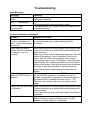
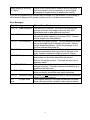
Error Messages
Error Message
"udr-Ld" Scale underload
"ovr-Ld"
"grs-oL"
"grs-uL"
"SU 0 E"
"Err EP"
"Er Ad"
"no SAV"
"Err 1"
error
What to Do or Check:
The scale is in underload. The load on the scale is less
then the minimum scale capacity by more than -20%.
Recalibrate scale or add additional dead load.
Scale overload
The scale is in overload. The load on the scale platform
exceeds the scale capacity by more than 103%. Remove
excess weight from scale platform.
Gross overload
The scale is in gross overload. The load exceeds the scale
ratings and might result in damage to the scale. Remove
excess weight immediately. Ignore this message for the
first five seconds after power up.
Gross underload The scale is in gross underload. The load exceeds the
minimum scale ratings and might result in damage to the
scale. Loadcell connections might be wired in reverse.
Startup zero error The scale was not stable, or a weight in excess of full load
was present on the platter when the scale started.
Remove the weight and wait. The scale will zero once it
becomes stable.
EEPROM error
The setup parameters loaded in nonvolatile memory have
become corrupted. The scale requires reinitialization by a
qualified scale technician.
A/D failure
The scale has detected a failure in A/D circuit. Have the
scale serviced by a qualified scale repair technician.
Values not saved. The scale has not successfully stored or verified parameter
value in nonvolatile memory.
Program ROM
The program memory in the scale has become corrupted.
Have scale serviced by a qualified scale repair technician.
8