1
Chapter 1
Introduction to Vision Builder AI
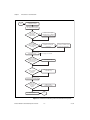
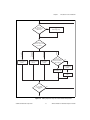
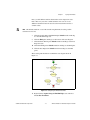
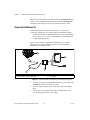
Start
Open Vision Builder AI
Configuration interface
Add step to acquire an image
of the parts under inspection
Do you
want to make
measurements in
real-world units?
Yes
Create or select a spatial
calibration from the Calibration
tab of the acquisition step
Yes
Add step from Locate Features
palette to locate the part
in the image
No
Do the parts
appear in different
locations from image
to image?
Add Set Coordinate System step
to create a coordinate system
based on the part location
No
Add Inspection steps
Do you
want to create
intermediate measurements
based on the results of
previous steps?
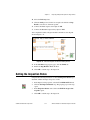
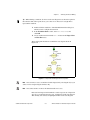
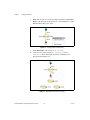
Refer to Figure 1-2 for details.
Yes
Add Calculator step
No
Do you
want to customize
the inspection
decision?
Yes
Add Logic Calculator step
or Calculator step
No
Add Set Inspection Status step
Do you
want to send
measurements to
an external
device?
Yes
Add one of the
Communication steps
No
Save inspection
Stop
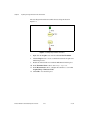
Figure 1-1. Instructions for Creating a Basic Vision Builder AI Inspection
NI Vision Builder for Automated Inspection Tutorial
1-2
ni.com