1
Anneth Embedded User Manual
Rev 1
LR Tech inc.
February 2014
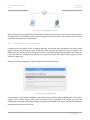
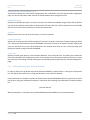
Fig. 2 - Edgar - AnnethEmbedded Connection
When running in this mode of operation, Anneth will start and open connections to each of the instrument devices
through the use of TCP (network) ports. This allows Edgar to connect to each of the configured devices of an
instrument and receive their streamed data.
2.1.1. Configuring the remote connect mode
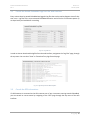
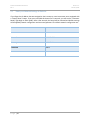
Configuring the local capture mode is a relatively easy step. You need to select which device you want to allow
Edgar to connect to and select the port number over which you want to stream data over the network. The
defaults TCP port numbers for each devices are the same in both Edgar and Anneth Embedded. This means that
if you leave the port numbers to their defaults, you should not need to worry about configuring the TCP port
numbers in Edgar after.
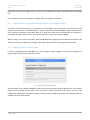
Access the “Anneth Configuration” page through the web interface top menu.
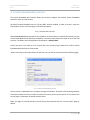
Fig. 3 - Anneth Embedded Mode Selection
The top section, titled “Anneth Embedded” mode, allows you to switch the software between the “local capture
mode” and the “remote connect mode”. Once you select a mode of operation in this section, the rest of the
configurations displayed in this page will adjust according to the selected mode. Select “Remote Connect Mode”
to configure the remote connect mode.
Page |3