1
FP6-7603 – TONES
Thinking ONtologiES
WP3
control is possible. For example, an ad-hoc nRQL query can be typed into the shell, and,
with the push of a button, one can focus on the returned ABox individuals in the ABox
graph tab. In our terminology, this kind of focusing by invoking inference services (such
as, e.g., direct-types) is called semantic focusing. However, one also often wants to focus
on individuals simply by their names. Thus, a kind of search field is needed. Objects that
contain the search string get selected automatically. This enables a so-called syntactic
focusing. We have found that many available tools don’t offer adequate mechanisms to
achieve this kind of information flow and focus control.
Summing up, we conclude that the current state must be a vector <current
objects,selected objects,active tab,display options>. Each time a state changing
operation is performed by the user (e.g., the current objects or the clipboard is changed),
a so-called history entry is automatically created, which is just a copy of the current state
vector. History entries are inserted at the end of a queue, the so-called navigation history.
A history navigator offers the standard navigation buttons. The OBIT always reflects the
current state, no matter whether this is the latest one or a historic state from the history.
A history entry only preserves the state information of the GUI, but not the content of
the DLS at that time. Thus, a well-known problem arises here: If a historic state is
reactivated, then it may no longer be possible to actually refer to the objects referenced
by that state, since they may have been already deleted from the DLS. This problem is
well-known to WWW users which keep a browsing history. There is no practical solution
to this problem (one cannot preserve “copies” of DLS server states in history entries).
We believe that OBITs should allow for asynchronous usage. While a time-consuming
command is processed by the DLS, the GUI shouldn’t block; instead, the result should be
delivered and displayed asynchronously once available. Although the busy DLS will not
accept further commands until the current request had been fulfilled (nowadays, there are
no true multi-user DLS), in the meantime the OBIT should a) display status information
in order to inform the user what the DLS is currently doing (future versions of RacerPro
and RacerPorter will also support progress bars), and b), if possible, allow the user
to do other things, e.g., continue editing a KRSS KB, or connect to and work with a
different DLS.
6.3
RacerPorter – How to Use
RacerPorter was designed according to the design principles just explained. Each tab
has a uniform organization, which, we believe, makes the GUI consistent and comprehensible. With the exceptions of the log tab and the about tab, each tab has six areas.
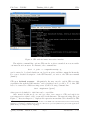
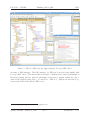
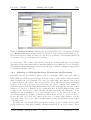
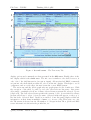
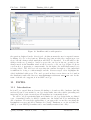
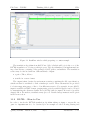
Figure 8 shows the taxonomy tab. Let us describe the six areas of this tab.
The first area shows the available tabs: Profiles, Shell, TBoxes, ABoxes, Concepts,
Roles, Individuals, Assertions, Taxonomy, Role Hierarchy, ABox Graph, Queries, Rules,
Log, and About tab. The second area is the status display. It displays the current
objects, the current namespace, the current profile (representing the current server connection), as well as the current communication status. The clipboard content is not
shown, only the cardinality of the sets of selected objects (in the small number fields).
The selected objects are highlighted once an appropriate tab is selected. The third area
shows the history navigator. The fourth area is the tab-specific main area. Tab-specific
c
2007/TONES
– March 31, 2007
32/55
TONES-D15 – v.1.1