1
KFL®
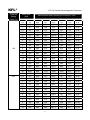
KFL-DC Series Electromagnetic Flowmeter
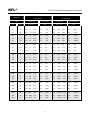
28
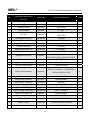
Exciting Mode
Optional
Mode 1,2,3
3
29
Sensor constant
Can be set
1~9
3
30
Flow coefficients Verification
Can be set
0.0000 ~ 5.9999
3
31
Instrument coefficients count
Can be set
0.0000 ~ 5.9999
3
Correctable
00000~99999
4
Correctable
0000~9999
4
Correctable
00000~99999
4
Correctable
0000~9999
4
32
33
34
35
Lower Digits of Forward
Total Flow
Higher Digits of Forward
Total Flow
Lower Digits of Reverse
Total Flow
Higher Digits of Reverse
Total Flow
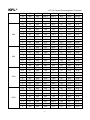
36
Date Year
Set by User
00~99
4
37
Date Month
Set by User
00~99
4
38
Date Day
Set by User
00~99
4
39
Time Hour
Set by User
00~99
4
40
Time Minute
Set by User
00~99
4
41
Time Second
Set by User
00~99
4
42
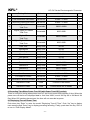
Password 1
Set by User
00000~99999
5
43
Password 2
Set by User
00000~99999
5
44
Password 3
Set by User
00000~99999
5
45
Password 4
Set by User
00000~99999
5
46
Zero-Current
Can be set
0.0000 ~ 1.9999
5
47
Full Scale of Current
Can be set
0.0000 ~ 3.9999
5
0.00005.9999
5
48 Verification Factors of Product Can be set
49
Instrument Code1
Fixed
Finished Y M0~99999
6
50
Instrument Code2
Fixed
Product Serial No. 0~99999
6
9. Recording Time When Power Turn-Off (with Power Turn-Off Function)
There is a clock for timing when power turns off, and it can record 256 numbers of time. When the
power turns off the form of displayed date is: from Year XXXX, month XX Day XX to XX Month XX
Day. When 256 numbers have stored, the time will not recorded anymore.
9.1 Displaying Turn-off Power Time
Push down key “Enter” to enter the model “Displaying Turn-off Time”. Push “Up” key to display
next recording and “Down” key to display preceding recording. Finally, push down the key “Exit” to
re turn to “Flow Display Model”.
- 19 -