1
Table of Contents
Welcome .......................................................................... 1
Safety Notice ................................................................... 1
Table of Contents ........................................................... 2
Getting Started................................................................ 4
Knowing your camera parts .................................................................. 4
Installing the battery ............................................................................. 5
Using the charger ................................................................................. 6
Inserting a memory card (optional) ....................................................... 7
Attaching the wrist strap (optional) ....................................................... 8
Basic Operations ............................................................ 9
Turning on your camera........................................................................ 9
Turning off your camera ........................................................................ 9
Using the LCD monitor ......................................................................... 10
Reading LCD indicators ........................................................................ 11
Setting time and language .................................................................... 12
Recording a video clip .......................................................................... 13
Taking a still picture .............................................................................. 15
Recording a voice clip .......................................................................... 16
Playing back your recordings ............................................................... 17
Playing MP3 music ............................................................................... 18
Connecting the camera to a TV ............................................................ 20
Advanced Operations .................................................... 21
Menu operation ..................................................................................... 21
Menu illustration ................................................................................... 21
Menu items in Camera mode ............................................................... 22
Menu items in Playback mode .............................................................. 25
Menu items in MP3 mode ..................................................................... 26
Menu items in Voice mode ................................................................... 26
Menu items in Setting mode ................................................................. 27
Copying Files to Your PC ............................................... 29
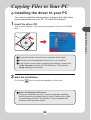
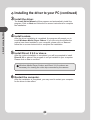
Installing the driver to your PC ............................................................. 29
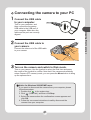
Connecting the camera to your PC ...................................................... 31
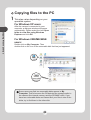
Copying files to the PC ......................................................................... 32
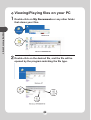
Viewing/Playing files on your PC .......................................................... 34
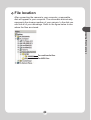
File location .......................................................................................... 35
2