1
LETTERBOX – This setting compresses the top and
bottom edges of the input signal, but fills the width of
the screen. For example, to preserve a widescreen
film image on a 4:3 display. When not using a 4:3
resolution, this mode is identical to Best Fit
6.5
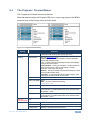
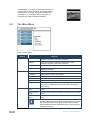
The Misc Menu
Figure 13: Misc Menu
Setting
Information
OSD
Keying
Function
Program
Displays the Program settings: selected input, input
resolution, frequency and output resolution
Preview
Displays the Program settings: selected input, input
resolution, frequency and output resolution
FW Versions
Shows the different FW versions
Network
Displays the network information: IP address, Netmask,
Gateway and DHCP
H Position
Set the horizontal position of the OSD
V Position
Set the vertical position of the OSD
Transparent
Set the transparency to On or Off
Gain
Set the transparency level (once set to transparent)
Bias
Set the transparency level
Timeout
Set to 30 seconds before OSD timeout, 60 seconds before
OSD timeout or Off (Off means that that the OSD appears
continuously)
Chroma Keying Set the threshold value of the red components for chroma
Red
keying
Chroma Keying Set the threshold value of the green components for chroma
Green
keying
Chroma Keying Set the threshold value of the blue components for chroma
Blue
keying
i
22
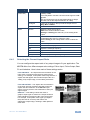
Note that the combination of threshold values (for red, green
and blue) determines the chroma keying threshold. Any image
with combined values of red, green and blue that are below
this threshold will become transparent when chroma keying is
enabled (see below).
VP-772 - The OSD Menu