1
10
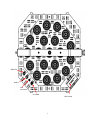
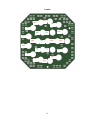
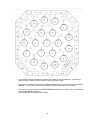
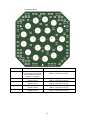
All lights labeled 10 in the
diagram above
0 = Off; 1 - 255 = On
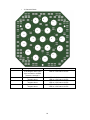
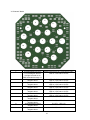
“20 Channels” Mode
•
13
12
14
11
4
15
5
10
3
1
6
16
9
2
7
17
8
18
20
DMX Channel
1
1
2
3
4
5
6
7
8
Lights Controlled
All lights labeled 2 through
21 in the diagram above if
the light is turned on via
DMX channels 1 through 20.
All lights labeled 1 in the
diagram above
All lights labeled 2 in the
diagram above
All lights labeled 3 in the
diagram above
All lights labeled 4 in the
diagram above
All lights labeled 5 in the
diagram above
All lights labeled 6 in the
diagram above
All lights labeled 7 in the
diagram above
All lights labeled 8 in the
diagram above
19
Function
Master Dimmer LED off = DAC set to 0 VDC
LED on = DAC set to 10 VDC
LED off = DAC set to 0 VDC
LED on = DAC set to 10 VDC
LED off = DAC set to 0 VDC
LED on = DAC set to 10 VDC
LED off = DAC set to 0 VDC
LED on = DAC set to 10 VDC
LED off = DAC set to 0 VDC
LED on = DAC set to 10 VDC
LED off = DAC set to 0 VDC
LED on = DAC set to 10 VDC
LED off = DAC set to 0 VDC
LED on = DAC set to 10 VDC
LED off = DAC set to 0 VDC
LED on = DAC set to 10 VDC
LED off = DAC set to 0 VDC
LED on = DAC set to 10 VDC
22