1
•
•
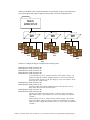
Improved hotfolder functionality and resource sharing (processes maximum of 100 items from each
folder before checking other enabled folders)
Improved responsiveness of user exit commands
Changes to the User Manual for New and Changed Features
The following information adds to or supercedes the noted sections in the CREW 1.05 User Manual. Until
such time as a new 1.10 version of the user manual is available, please refer to this document before using
the 1.05 manual. Unless noted here, all other features are the same as noted in the 1.05 version of the user
manual.
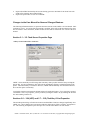
Section 3.1 – 3.5: Task Server Properties Page
“Always Create Printer File” check box:
CREW 1.10 has the ability to buffer image data in memory where possible instead of always writing the
data to disk. In some circumstances, this will result in much higher efficiency in transferring data to the
printer. When the memory is needed for other uses, CREW will automatically write the data to the hard
drive and free up the used memory.
Leaving this checkbox unselected (the default setting) will enable this feature. If you experience repeated
“Fault XXX” errors on your printer, you may wish to try turning this feature off (by checking the selection
box and restarting Task Server).
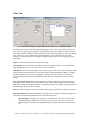
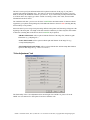
Sections 3.8 – 3.24 (HFC) and 3.7 – 3.23 (TaskGen): Print Properties
The Print Properties dialogs of both Task Generator and Hotfolder Client have changed significantly since
CREW 1.05. These changes have been made to make the dialogs more effective, intuitive, and quicker to
use. The following descriptions replace the respective sections of the CREW 1.05 user manual.
CREW 1.10 Release Notes, June 19, 2002. Rev 1.0. Document #13307-003, Copyright 2002 Gretag Imaging Inc.