1
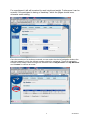
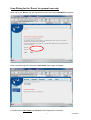
In the top head line there are 5 buttons with which the User can carry out inputs and
adjustments according to each Event.
By click on ’My Account’ one get to the mask ‘View accounts’.
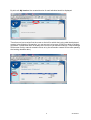
Here a permitted person can define for his individual studio in ‘Rema’ new members with the
‘Add’ button. For changes and deletes of a member one have to select with the left ‘radio
button’ at the beginning of this line and then click either the. ‘Change oder Delete’ Button.
By a click on ’Studio address’ the address of the personal studio can be updated.
2
25.08.2012