1
Setup – Network
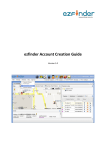
The Setup – Network screen allows
you to manage the network settings
of this MS-200.
When making changes to the network screen – the
MS-200 will automatically reboot after the Submit button
has been pressed – this can take up to two minutes and
requires you to re-log into the MS-200 via your browser.
Select DHCP or Static
according to your
internal network policies
If you are using Static IP,
then the remaining
network information will
need to be filled in
manually.
After making a
change, press
the Submit
button to send
the changes to
the MS-200
The Time Server is optional. For the mic usage assessment
feature, the system needs a time server. The system will try
to find one automatically by finding a list of public time
servers. However, if the system is behind a firewall that
blocks port 123, an internal time server needs to be put here.
4/29/2013
16