1
Perigee Power Solutions
Solar Power Kit User Manual
Using your Kit
Step 2
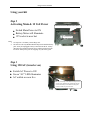
Activating Main & 12 Volt Power
Switch Main Power to ON
Battery Meter will illuminate
12V socket is now hot
Main Power Switch On illuminates battery meter.
12V socket is hot
Notes:
1. See steps 4 & 5 for battery status\charge info.
2. The 201 kit is the only Medium Kit that ships with a modular battery
pack. It may be unplugged & easily removed from the kit. Always
disconnect any attached electrical device and shut off the kit (both
inverter & main power) prior to swapping out your battery pack.
Step 3
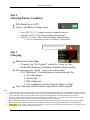
Using 120 AC (inverter on)
Switch AC Power to ON
Green “AC” LED illuminates
AC outlets are now live
The AC power only works when the main power is
on and can be checked by the green LED near the
rocker. Remember you’re limited to wattage the
inverter is rated for your AC devices.
-3-