1
How to set up the CCD scanner for use with ComTrac POS
1. Scan the Program barcode.
3. Scan the Option Code 3 barcode.
2. Scan the Preamble barcode.
4. Scan the End barcode.
3. Scan the preamble barcodes.
5. Scan the Program barcode.
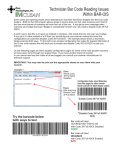
Scan first
Scan second
6. Scan the Auto Power Off Duration barcode.
4. Scan the Finish barcode.
7. Scan the Option Code 2 barcode.
5. Scan the End barcode.
8. Scan the End barcode.
6. Scan the Program barcode.
9. Scan the Program barcode.
7. Scan the UPC Setting barcode.
10. Scan the Double Scan Verification barcode.
8. Scan the Option Code 3 barcode.
11. Scan the Option Code 3 barcode.
9. Scan the End barcode.
12. Scan the End barcode.
[OPTIONAL] This will set up the CCD scanner to
stay on for 5-6 seconds after the trigger is pressed,
or after the scanner scans a good barcode, and will
program it to avoid inadvertent double scans.
1. Scan the Program barcode.
2. Scan CCD/Laser Scanner Operation Mode.
If things get completely messed up on your scanner,
you can scan the Master Default barcode below to
reset it.