1
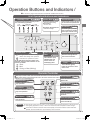
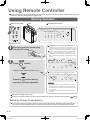
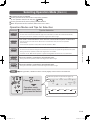
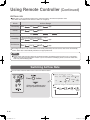
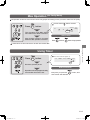
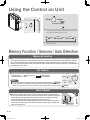
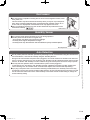
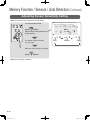
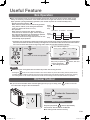
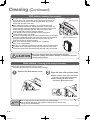
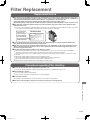
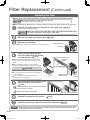
t/ Operation Buttons and Indicators / P.* shows a page in the instruction manual with additional information. Unit Operation Buttons and Indicators Humidity Level P.E-14, 19 Operation Mode Indicates approximate humidity level in the room during operation. Shows the operation mode. Air Purify, Pollen, Strong Deodorization Indicator: Green Humidify, Skin Moisturize Indicator: Orange Humidity Level On/Off Button P.E-18 Press this button to start or stop operation and to switch the operation mode. Air Sensor P.E-18 Features / Name of Each Component / Operation Buttons and Indicators / Accessories Low Moderate High Orange Orange Green Orange Orange P-A8000 P.E-15 The indicator lights up or flashes green to indicate the air condition detected by the dust/odor sensor. (Approx.) Air Purify Pollen Strong Deodorization Skin Humidify Moisturize Timer(4hrs) Ai r Sensor r Clean Max(Blinking) Humidifying Filter Auto Airflow Level P.E-16 These indicators (green) indicate the airflow rate during operation. Auto : Airflow rate during auto operation : Indicates eco operation is active. These indicators show the airflow rate selected using the airflow button on the remote controller. : Silent : Med : Strong or Max (blinking) Clean Humidifying Filter P.E-22 This indicator (red) indicates that it is time to clean the humidifying filter. Infrared Remote Receiver Receives the signal from the remote controller. Timer P.E-17 This indicator (green) lights up when the 4-hour timer is set. Remote Controller When using the remote controller, point it at the infrared remote receiver on the unit indicator section. P.E-16 When aimed squarely at the infrared remote receiver, the remote controller can be used at Airflow Button distances of up to approximately 6 m. Press this button to switch airflow rate. On/Off Button P.E-14 Press this button to start or stop operation. Mode Button eco Button Press this button to switch operation mode. P.E-21 Press this button to start or stop eco operation. Max Button P.E-17 Press this button to start max operation. Note Timer Button P.E-15 P.E-17 Press this button to set Off-timer. Sensor Setting Button P.E-20 Press this button to switch sensor sensitivity. The remote control may not work in a room where inverter lighting apparatus or electronic quick start lighting apparatus is used, or when the infrared receiver is exposed to direct sunlight. The remote controller works best when aimed squarely at the remote infrared receiver. Whenever possible, use the controller from a point directly in front of the unit. E-3 T_S-EP-A6000.indd 3 2012/08/02 15:54:10