1
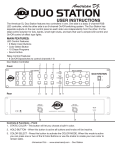
UC3 RECEIVER
UC3 WIRELESS CONTROLELER
CONTROLS AND FUNCTIONS UC3 RECEIVER:
1. Antenna - Receives the signal from the UC3 Wireless Controller.
2. Power Switch - This switch powers on the UC3 Receiver.
3. Set Up Button - Press this button to set up the receiver.
4. RF SIGNAL LED - This LED will glow when the Set Up button has been pressed.
5-8. LED Outputs 1-4 - These LED’s will glow indicating activity. Example, the Stand By LED will glow when the unit is in Stand By mode.
9. Power Cord Inlet - This unit is equipped with a removable I.E.C. power cord. Be sure to only use the power cord included with the unit, this cord is designed to match the electrical require-
ments of the unit. Other cords may cause the unit to overheat or malfunction. Voltage may vary from venue to venue, when connecting this unit to a power supply be sure to connect to a
matching power outlet. Never use this fixture if the ground prong has been removed or broken off. The ground prong is designed to reduce the risk of fire or electrical shock in the event the unit suffers from an internal short.
10-13.1/4” Output Jacks - Connect your desired UC3 compatible fixture to these jacks.
UC3 WIRELESS CONTROLLER:
14. RF SIGNAL LED - This LED will blink when a command from the controller has been sent to the receiver.
15. Lock Button - Hold this button for at least 5 seconds to lock the controller. This will help pre-
vent accidental changes of your running program or show. Hold this button again for at least 5 seconds to unlock the controller.
16-19. Stand By, Function, and Mode Buttons - Use these buttons to control your connected fix-
ture. Please refer to your units user manual for its UC3 functions and controls. Each row of buttons corresponds to one of the 1/4” inputs.
American DJ®
American DJ Europe
American DJ World Headquarters:
Junostraat 2
6122 S. Eastern Ave. Los Angeles, CA 90040 USA
6468 EW Kerkrade
Tel: 323-582-2650 / Fax: 323-725-6100
Netherlands
Web: www.americandj.com /
Tel: +31 45 546 85 00 / Fax: +31 45 546 85 99
E-mail: info@americandj.com
service@americandj.eu / www.americandj.eu