1
Options
Data Options
The Data tab allows you to specify which databases to use in geocoding. Databases contain the address
and geocode data necessary to determine the geocode for a given address. There are two kinds of
databases: standard databases and custom databases. Standard databases are those supplied by
Pitney Bowes Software and based on address and geocoding data from postal authorities and suppliers
of geographical data. Custom databases are databases you create to enhance or augment standard
databases for your particular needs.
The following table lists the options available for specifying which databases to use and the search order
of databases.
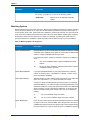
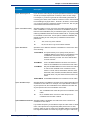
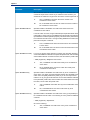
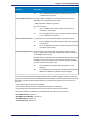
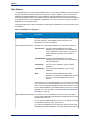
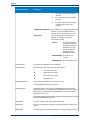
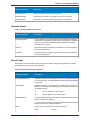
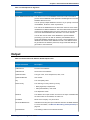
Table 4: Data Options for Argentina
Parameter
Description
Option.Database
Specifies the database to be used for geocoding. Only databases that
have been defined in the Databases Resources panel in the
Management Console are available.
Option.DatabasePreference
Specifies which geocoding databases to use. One of the following:
PreferCustom
Use both standard databases and custom
databases, but give preference to candidates from
custom databases. Use this option if you feel your
custom database is superior to the standard
database.
PreferStandard Use both standard databases and custom
databases, but give preference to candidates from
standard databases.
CustomOnly
Use only custom databases. Ignore standard
databases.
StandardOnly
Use only standard databases. Ignore custom
databases.
Both
Use both standard databases and custom
databases. In cases where candidates are returned
from both, the standard database is preferred.
Default.
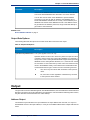
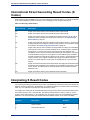
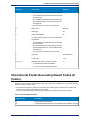
The results from a custom database have a "U" at the end of the result
code. Results from an address database have an "A" at the end of the
match score. For example: S5HPNTSCZA is a match score that comes
from an address database, while S5HPNTSCZU comes from a custom
database. For more information, see Result Codes for International
Geocoding on page 33.
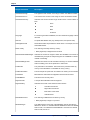
Option.DatabaseSearchOrder The name of one or more database resources to use in the search
process. Use the database name specified in the Management Console's
Database Resources tool.
You can specify multiple database resources. If you specify more than
one database, list them in order of preference.
The order of the databases has an effect when there are close match
candidates from different databases. The close matches that are returned
16
Spectrum Technology Platform 9.0 SP3