1
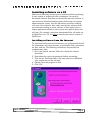
If you are unsure of the system software version installed on your
PC, open the ‘Windows Explorer’ folder located on your desktop.
If the ‘Windows Explorer’ folder is not on your desktop, click on
the ‘Start’ button on the bottom left corner of the desktop. Once
the ‘Start’ menu is open, go to ‘Windows Explorer’. Another
method of opening the ‘Windows Explorer’ folder is by using the
keyboard. Press the ‘Windows’ key and ‘E’. ‘Right click’ your
mouse on ‘My Computer’ and a menu window will appear. Select
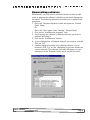
‘Properties’. As seen in the image below, information about your
computer and its system is listed here.
•
If your version number is below of what is required by your
software, you may not be able to install the software. Your PC
must be equipped with at least 64 megabytes (MB) of available
random access memory (RAM).
The amount of RAM installed on your computer appears in the
‘System Properties’ window. By clicking on the ‘Performance’ tab
in the ‘System Properties’ window, you will see how much free
space is available on your computer.
CSLP- Software Installation (PC)
Page 2