1
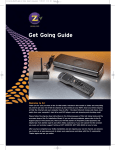
Welcome to ZeeVee.
Table of Contents
ZeeVee products convert your video and audio source to
Front and Back Panels . . . . . . . . . . . 4
a digital cable channel and broadcast it over coax to all
Basic Installation. . . . . . . . . . . . . . . . 5
your HDTVs. This guide walks you through basic and more
Beginning setup. . . . . . . . . . . . . . . 5
enhanced setup for ZeeVee’s ZvPro 800 modulators.
Tuning your channel at
For support, repairs, and warranty service contact the
distributor where you purchased the product. For additional
questions call +1(877) 4-ZEEVEE (1.877.493.3833).
the HDTV (Auto Scan). . . . . . . . . . . 5
Front Panel Configuration . . . . . . 6-7
Setting the RF broadcast
channels or power . . . . . . . . . . . . . 6
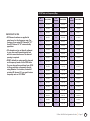
CCIR Table vs Frequency Map. . . . 7
What’s in the Box
Here’s what you can expect to find when you open the package:
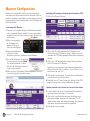
Maestro Configuration. . . . . . . . . 8-9
Connecting with Maestro. . . . . . . . 8
Configuring RF numbers
and virtual channels . . . . . . . . . . . . 8
Labeling channels with channel
ZeeVee Modulator
and content information. . . . . . . . . 8
Power Cord
and Adaptors
Using other Maestro tabs. . . . . . . . 9
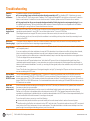
Troubleshooting . . . . . . . . . . . . . . 10
Warranty. . . . . . . . . . . . . . . . . . . . . 11
Available Separately
HDMI Cables
Declaration of Conformity. . . . . . 12
Contact ZeeVee. . . . . . . . . . . . . . . 12
ZvP ro 800-EU C onfi gurati on Gui de
|
P age 3