1
Thank you for choosing The Shintaro Mini Bluetooth Keyboard with
Touchpad. The following user manual will outline the steps involved in
connecting the keyboard to Laptops and Desktop PCs.
CONNECTION WITH LAPTOP (Windows XP or later versions)
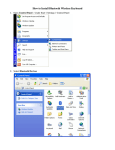
1. Make sure the laptop already has a built-in Bluetooth device. Open
Control Panel and double click “Bluetooth Device”. Refer “Picture 1”
(Picture 1)
2. The “Bluetooth Device” dialog box will appear, click “Add Bluetooth
device”.
3. Turn on keyboard, the ON/OFF switch is located underneath
the keyboard (
green light flashes quickly). The “List of
Bluetooth Devices” dialog box should appear. Refer to “Picture 2”.
2