1
Smart
Q
Motion sensor
TECHNOLOGY
Introduction ................................................................................................................................ 2
Connecting................................................................................................................................. 2
Ranges ...................................................................................................................................... 3
Practical information .................................................................................................................. 3
Time range................................................................................................................................. 7
Investigations............................................................................................................................. 7
To create Velocity or Acceleration data................................................................................... 10
Creating Presets ...................................................................................................................... 11
Warranty .................................................................................................................................. 12
Introduction
The Smart Q Motion Sensor is a sonar device that emits ultrasonic pulses, which reflect off an
object. It measures the time it takes a high frequency sound pulse to travel from the Sensor to an
object and back. This time data is used, together with the speed of sound, to determine the
distance of an object from the Sensor.
The Motion sensor is supplied with a steel rod (size 80 mm long x 10 mm diameter with a M6
thread). The rod can be screwed into the mounting threads, which are found at the base and on
the sides of the Motion sensor. The rod can be used for clamping into a suitable holding device
e.g. a retort stand.
The Smart Q Motion Sensor is equipped with a micro controller that greatly improves the
accuracy, precision and consistency. It is supplied calibrated and the stored calibration is
automatically loaded when the Motion sensor is connected.
Connecting
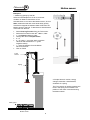
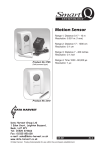
Mounting thread
Mounting thread
Red signal
received LED
Insert the sensor cable with the
locating arrow facing forwards
Mounting thread
•
Push one end of the sensor cable (supplied with the EASYSENSE unit) into the shape socket on
the side of the Motion sensor with the locating arrow on the cable facing forwards.
•
Connect the other end of the cable to the input socket on the EASYSENSE unit.
•
The EASYSENSE unit will detect that the Motion sensor is connected and display values
using the currently selected range. If the range is not suitable for your investigation, set to
the correct range (see page 3).
The red signal LED on the Motion sensor will only light when the EASYSENSE unit is powered and a
signal has been reflected from the object. It will emit a clicking sound each time a pulse is sent.
Note: The red signal LED on the Motion Sensor is not a power on indicator; it is used to indicate that a
reflected signal has been received from an object.
The Motion Sensor will start to pulse at approximately 50 pulses per second (every 20 ms). If the time
for a pulse to reflect off an object is longer than 20 ms (when the object is over 2 metres away),
pulses will slow.
2