1
Table of Contents
1.
2.
3.
Overview......................................................................................................................................5
1.1
Features ......................................................................................................................5
1.2
Package Contents .......................................................................................................6
1.3
Dimensions ..................................................................................................................7
1.4
Connectors ..................................................................................................................8
Camera Cabling .........................................................................................................................10
2.1
Connect Power .......................................................................................................... 10
2.2
Connect Ethernet Cable ............................................................................................ 11
2.3
Connect Alarm I/O ..................................................................................................... 11
Installation .................................................................................................................................12
3.1
Ceiling/Wall Mounting ................................................................................................ 12
4.
System Requirements................................................................................................................13
5.
Accessing Camera .....................................................................................................................14
6.
5.1
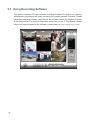
Using Recording Software ......................................................................................... 18
5.2
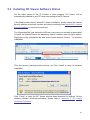
Installing DC Viewer Software Online ......................................................................... 19
Configuration & Operation ......................................................................................................... 21
6.1
Browser-based Viewer Introduction............................................................................ 21
6.2
Home Page................................................................................................................23
6.3
System Related Settings ............................................................................................ 25
6.3.1
Host Name and System Time Setting ....................................................................... 26
6.3.2
Security ....................................................................................................................27
6.3.2.1
User ...........................................................................................................................28
6.3.2.2
HTTPS.......................................................................................................................30
6.3.2.3
IP Filter ......................................................................................................................32
6.3.2.4
IEEE 802.1X .............................................................................................................. 33
6.3.3
Network ....................................................................................................................35
6.3.3.1
Basic .........................................................................................................................36
6.3.3.2
QoS ...........................................................................................................................39
6.3.3.3
SNMP ........................................................................................................................41
6.3.3.4
UPnP .........................................................................................................................43
6.3.4
DDNS .......................................................................................................................45
6.3.5
Mail ...........................................................................................................................46
6.3.6
FTP ..........................................................................................................................47
6.3.7
HTTP ........................................................................................................................48
5.3.8
Application ................................................................................................................49