1
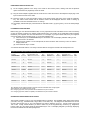
PREPARING THE SCALE FOR USE
(i)
Fit the weighing platform to the body of the scale via the location points, making sure that the platform
opens toward the front (keyboard) end of the scale.
(ii) Plug the mains adapter supplied with the scale into the mains and connect the adapter's output plug to the
input socket at the rear of the scale.
(iii) Place the scale on a firm level surface, switch on the mains supply and press on the scale the "ON/OFF"
key. The scale’s serial number and its software version will be displayed while the scale is starting up
(available for Exceed Australia Version 3.2 and up).
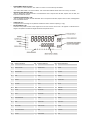
(iv) The display will indicate P(01) which stands for "Standard Letter”, 0g (zero grams) " and 0 as initial postage
cost.
LODGEMENT ZONE SETTING
Before using your new Exceed Australia scale, it is very important that it be told where it lives. This is necessary
so that the internal computer can assess postal charges from your location to any destination within Australia.
Determine your lodgment zone from the table below. For example, if your postcode is 2488, then your lodgment
zone is N2 (which is second press of key 7). To set the lodgment zone:
(i) Press the keys 0, 7, and Parcel Post keys in succession. The zone display will blink waiting for the
lodgment zone to be entered.
(ii) Enter the zone number. For our example N2, the zone number is A02. Press key 7 twice or until the
display reads A02.
(iii) Press the Enter key to confirm.
Your Exceed Australia scale is now ready to assess distance charges for Parcel Post and Express Post.
Regular Parcel and Express Post Parcel Zones
Postcode
Zone
New South Wales
New South Wales (cont.)
Zone
Victoria (cont.)
2880
S2 ●
3945-3971
Zone
V2
Queensland (cont.)
9880-9919
Zone
Q2
0200-0299
N2
2881-2889
N2
3972-3978
V1
9920-9959
Q3
1000-2263
N1
2890
N1
3979
V2
9960-9999
Q4
2264-2484
N2
2891-2898
N2
3980-3983
V1
2485-2486
N2/Q1 ◆
NF ▲
3984-3999
V2
South Australia
2487-2499
N2
N2
8000-8999
V1
5000-5199
S1
2500-2530
N1
5200-5749
S2
2531-2554
N2
Victoria
5800-5999
S1
2555-2574
N1
3000-3220
V1
4000-4224
2575-2639
N2
3221-3334
V2
4225
2640-2641
V2/N2 ◆
3335-3341
V1
4226-4299
Q1
2642-2647
N2
3342-3424
V2
4300-4449
Q2
V2 ■
3425-3443
V1
4450-4499
Q3
Western Australia
N2
3444-3688
V2
4500-4549
Q1
6000-6214
2715
V2 ■
3689-3690
V2/N2 ◆
4550-4699
Q2
6215-6699
W2
2716
N2
3691-3749
V2
4700-4805
Q3
6700-6799
W3 †
2717-2719
V2 ■
3750-3811
V1
4806-4899
Q4
6800-6999
W1
2720-2730
N2
3812-3909
V2
9000-9299
Q1
2731-2739
V2
3910-3920
V1
9400-9596
Q1
Tasmania
2740-2786
N1
3921-3925
V2
9597-9599
Q2
7000-7999
2787-2879
N2
3926-3944
V1
9700-9799
Q1
2648
2649-2714
2899
2900-2999
Queensland
Q1
N2/Q1 ◆
Northern Territory
0800-0999
NT1
W1
T1 †
▲For Regular Parcels lodged in NSW for Norfolk Island the interstate basic charge applies.
◆Use whichever zone offers the lower charge.
■ For charging purposes, these postcodes are considered to be part of Victoria.
● For charging purposes, Broken Hill (2880) is considered to be part of South Australia.
OPERATING THE EXCEED POSTAL SCALE
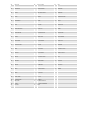
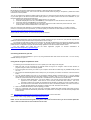
The Exceed Australia is easy to use and straightforward in operation. First establish which basic postal service
you wish to use (e.g., Standard Letter, Large Letter, Local Letter, etc.). The lodgment or destination zone can be
set using the numeric keys (1-16). The lodgment zone factory default is set to N1. Country codes range from
100 to 593. Finally, decide whether you wish to utilize any of the supplementary services (e.g., Registered,
Insured, COD, etc.) and simply press the appropriate keys in turn. The display will guide you through, displaying
the services selected and the total postage cost.