1
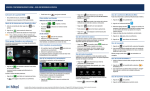
The dashboard is divided into four sections:
•
•
•
The top row, labeled My Documents, shows options for exploring files on your device, memory
card, and cloud services. You can choose whether to view these as a hierarchy of directories, or
a stream of previously viewed files. You can also choose to create a new document.
The next level down shows example files and links to important parts of the application. You can
use the tabs at the bottom to choose between these.
A small banner shows a news feed of information from SmartOffice, helping you to keep up to
date with improvements to your products. You can tap on any story to read more about it.
Community
SmartOffice is part of a community and eco-system of applications and services designed to
help you get the most out of your mobile device.
Tell your friends about SmartOffice, by choosing Share. This simply lets you send an email with
a link for them to download the app.
If you like the application, please Rate it in the app store so other people can appreciate it too!