1
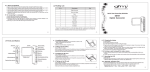
Loading the battery
Please use two AA batteries.
1. Slide open the battery compartment cover as indicated.
2. Load the batteries into the battery compartment with + and - ends correctly installed.
3. Replace the cover.
open
close
Inserting the SD/MMC card (optional)
1. Lift the SD card cover.
2. Insert the card in the direction of indication until it reaches the end of the slot.
3. When using a SD card, the built-in memory will become inaccessible.
4. To remove the SD card, gently push the card until it pops up.
2