1
10
220SW 9 L CD
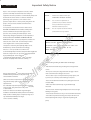
P hilips P ixel Defec t P olic y
P hilips ' F lat P anel Monitors P ixel Defec t P olic y
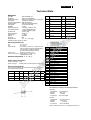
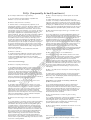
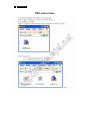
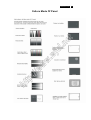
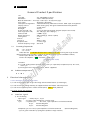
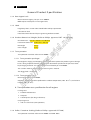
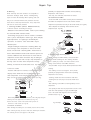
B lack Dot Defects B lack dot defects appear as pixels or s ub
pixels that are always dark or 'off'. T hat is, a dark dot is a
s ub-pixel that s tands out on the s creen when the monitor
dis plays a light pattern. T hes e are the types of black dot defects
T wo or three adjacent dark
s ub pixels
t
One dark s ub pixel
ne
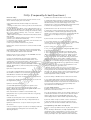
P hilips s trives to deliver the highes t quality products . W e us e
s ome of the industry's mos t advanced manufacturing proces s es
D and practice s tringent quality control. However, pixel or s ub pixel
defects on the T F T LC D panels us ed in flat panel monitors are
s ometimes unavoidable. No manufacturer can guarantee that all
panels will be free from pixel defects , but P hilips guarantees that
any monitor with an unacceptable number of defects will be
repaired or replaced under warranty. T his notice explains the
different types of pixel defects and defines acceptable defect
levels for each type. In order to qualify for repair or replacement
under warranty, the number of pixel defects on a T F T LC D panel
must exceed thes e acceptable levels . F or example, no more than
0.0004% of the s ub pixels on a 19" XG A monitor may be
defective. F urthermore, P hilips s ets even higher quality
s tandards for certain types or combinations of pixel defects that
are more noticeable than others . T his policy is valid worldwide.
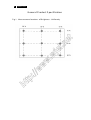
P roximity of P ixel Defec ts
el.
B ecaus e pixel and s ub pixels defects of the s ame type that are
near to one another may be more noticeable, P hilips als o
s pecifies tolerances for the proximity of pixel defects
P ixel Defec t Toleranc es
w.
wj
In order to qualify for repair or replacement due to pixel defects
during the warranty period, a T F T LC D panel in a P hilips flat
panel monitor must have pixel or sub pixel defects exceeding the
tolerances lis ted in the following tables .
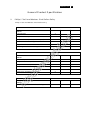
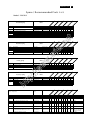
P ixels and S ub pix els
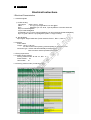
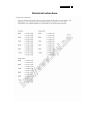
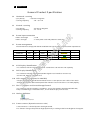
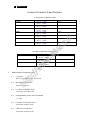
B R IG HT DOT DE F E C T S
AC C E P T AB L E
L E VE L
220S W 9
MODE L
ww
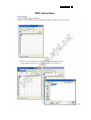
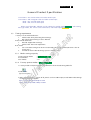
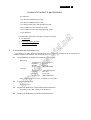
A pixel, or picture element, is compos ed of three s ub pixels in the
primary colors of red, green and blue. Many pixels together form
an image. W hen all s ub pixels of a pixel are lit, the three colored
s ub pixels together appear as a s ingle white pixel. W hen all are
dark, the three colored s ub pixels together appear as a s ingle
black pixel. Other combinations of lit and dark s ub pixels appear
as s ingle pixels of other colors .
Types of P ixel Defec ts
://
P ixel and s ub pixel defects appear on the screen in different
ways . T here are two categories of pixel defects and s everal types
of s ub pixel defects within each category.
ht
tp
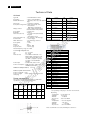
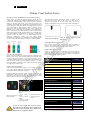
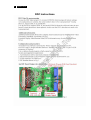
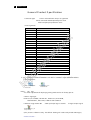
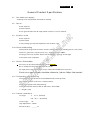
B right Dot Defects B right dot defects appear as pixels or s ub
pixels that are always lit or 'on'. T hat is , a bright dot is a s ub-pixel
that stands out on the s creen when the monitor dis plays a dark
pattern. T here are the types of bright dot defects :
T wo adjacent lit s ub
pixels :
- R ed + B lue =
T hree adjacent lit s ub
One lit red, green or P urple
pixels (one white
blue s ub pixel
- R ed + G reen =
pixel)
Y ellow
- G reen + B lue =
C yan (Light B lue)
A red or blue bright dot mus t be more
than 50 percent brighter than neighboring
dots while a green bright dot is 30 percent
brighter than neighboring dots .
1 lit s ubpixel
3
2 adjacent lit s ubpixels
1
3 adjacent lit s ubpixels (one white pixel)
0
Dis tance between two bright dot defects *
>25mm
T otal bright dot defects of all types
B L AC K DO T DE F E C T S
3
AC C E P T AB L E
L E VE L
220S W 9
MODE L
1 dark s ubpixel
5
2 adjacent dark s ubpixels
2
3 adjacent dark s ubpixels
0
Dis tance between two black dot defects *
>15mm
T otal black dot defects of all types
5
T OTAL DOT DE F E C T S
AC C E P TAB LE
LE VE L
MODE L
220S W 9
Total bright or black dot defects of all types
5
Note: * 1 or 2 adjacent s ub pixel defects = 1 dot defect