1
Expert 24 user manual
3. Operation
3.1 The Control Panel
3.1.1
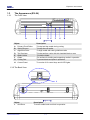
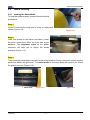
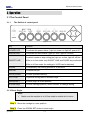
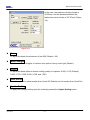
The Outline of control panel
Figure 3-1
Key
Function
POWER LED
To indicate the power status ( light up: power on; light off: power off )
ERROR LED
To indicate the error status ( light up: error; light off: normal )
To switch modes or stop cutting job( light up: on-line; light off: off-line )
ON/OFF LINE
While in on-line mode: only ON/OFF LINE and PAUSE keys activated
While in off-line mode: the settings in VLCD can be adjusted.
PAUSE
To temporarily halt cutting process or to continue
REPEAT
To repeat last job.
DATA CLEAR
To clear up buffer memory.
CUT TEST
To perform cutting tests in different ways.
ORIGIN SET
To reset origin at a new position.
4 Arrow Keys
To move carriage position, select function, or change setting.
3.1.2 Reset Origin
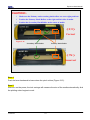
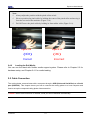
Note:
9 Make sure the machine is in off-line mode to enable this function.
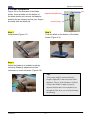
Step 1 Move the carriage to a new position.
Step 2 Press the ORIGIN SET button to reset origin.
Operation
3-1