1
Chapter 10
THE APPOINTMENT BOOK
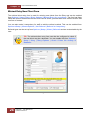
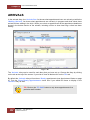
Minimal Entry New Client Form
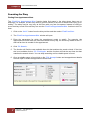
The minimal client entry form is used for entering new clients from the Diary and can be enabled
from Options | Setup | Diary | Diary Options | Minimal Entry for new clients. The form has fewer
fields and ensures that before the new client can be saved, provided staff have entered a name and
one form of contact.
You can also make it compulsory for staff to add the referral method. This can be enabled from
Options->Setup | Client->Options | Use Referral | Referral is Compulsory.
Referral types can be set up from Options | Setup | Client | Referrals and are customisable by the
user.
TIP: The minimal client entry form can also be configured to check if
the new client may be a duplicate. You can enable this from Options |
Setup | Diary | Diary Options | Check if New Cln already in
Database.
Fig. 6 - 19
26
HAIRLINKSQL User Manual v4.5
Updated 01/05/2012