1
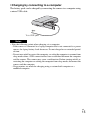
Charging the battery pack
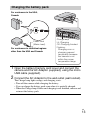
For customers in the USA,
Canada
Power cord
(Mains lead)
For customers in countries/regions
other than the USA and Canada
Charge lamp
Lit: Charging
Off: Charging finished
Flashing:
Charging error or
charging paused
temporarily because
the camera is not
within the proper
temperature range
the battery/memory card cover and connect the
1 Open
camera and the AC Adaptor (supplied), using the micro
USB cable (supplied).
the AC Adaptor to the wall outlet (wall socket).
2 Connect
The Charge lamp lights orange, and charging starts.
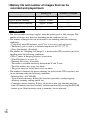
• Turn off the camera while charging the battery.
• You can charge the battery pack even when it is partially charged.
• When the Charge lamp flashes and charging is not finished, remove and
re-insert the battery pack.
GB
13