1
Console Management
Connecting to the Console Port
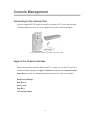
Use the supplied RS-232 cable to connect a terminal or PC to the console port.
The connected terminal or PC must support the terminal emulation program.
Connecting the switch to a terminal via RS-232 cable
Login in the Console Interface
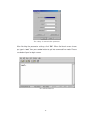
When the connection between Switch and PC is ready, turn on the PC and run a
terminal emulation program or Hyper Terminal and configure its communication
parameters to match the following default characteristics of the console port:
Baud Rate: 9600 bps
Data Bits: 8
Parity: none
Stop Bit: 1
Flow control: None
15