1
Chapter 5
SNMP Trap
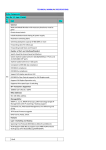
SNMP Trap alerts users to event occurrences in your monitored environment. To
enable SNMP Trap, you must add Target IP addresses to the Target IP list. Specify
the Community String, Trap Type, MIB, SNMPv3 User Name, UDP port, and Event
Level, and click Add. If you wish to update or delete a Target IP address, specify
the IP address in the Target IP list, and click Update or Delete.
http://192.168.1.100/
NOTE
The InsightPower SNMP IPv6 provides SNMPv1, v2c and v3 traps to satisfy most of customers’ environments. If you use the SNMPv3 trap, please
provide one of the user names in the SNMPv3 USM table.
You can determine what event notifications should be sent to the Target
IP(s) from Event Level. Three Event Levels are listed as follows:
z Information: All event notifications are sent to the target address.
z Warning:
Both Warning and Alarm event notifications are sent to
the target address.
z Alarm: Only Alarm event notifications are sent to the target address.
You can go to Device Ȼ Management Ȼ Event Level to change the
event level.
47