1
2.2
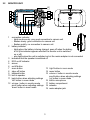
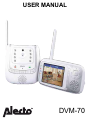
MONITOR UNIT:
18
16
MIC
1
15
2
13
3
11
14
12
4
5
6
7
8
9
10
17
1
6VDC / 800mA
connection indicator:
- lights continuously: very good connection to camera unit
- flashes slowly: good connection to camera unit
19
- flashes quickly: no connection to camera unit
2 battery indicator
- lights when the battery is being charged, goes off when the battery
is full (this indicator appears whether the monitor unit is switched
on or off)
- also lights when the unit is switched on but the mains adapter is not connected
3 indication that the speaker is switched off
4 ECO on/off indicator
5 screen
6 on/off button
7 zoom button
13 ‘right’ button in zoom mode
8 video off button
14 menu button
9 talkback button
15 volume + button in monitor mode
10 built-in speaker
scroll button when adjusting settings
11 back button when adjusting settings
‘up’ button in zoom mode
‘left’ button in zoom mode
16 built-in microphone
12 volume - button in monitor mode
17 battery compartment
scroll button when adjusting settings 18 antenna
‘down’ button in zoom mode
19 mains adapter jack
3