1
it fact sheet
Your web browser
To access the internet via AirUWS, your browser must use our proxy server. UWS
owned standard laptops will have the correct settings by default; however users of all
privately owned computers will need to ensure their proxy settings are set to
automatically detect settings. You may need to change this setting back to that
recommended by your Internet Services Provider (ISP) for non-UWS use.
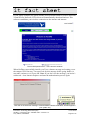
• Open Internet Explorer’s Tools menu Æ Internet Options Æ Connections tab
Æ LAN settings… Æ ensure Automatically detect settings is the only option
ticked Æ click OK.
IE’s proxy settings
Internet Explorer 6 users will need to change a setting so that IE uses HTTP 1.1
through proxy connections. IE 7 has this setting enabled by default. This setting
should not need to be changed back for non-UWS use.
• Open Internet Explorer’s Tools menu Æ Internet Options Æ Advanced tab Æ
scroll to HTTP 1.1 settings Æ tick Use HTTP 1.1 through proxy connections
Æ click OK.
Information Technology Directorate (ITD)
AirUWS – connecting a PC – detailed notes – Version 1.2.1
Tony Fathers, 26/03/2007
IT fact sheet
Page 2 of 12